Find cloud waste.
Deliver remediation.
WasteLine scans your AWS environment for orphaned, idle, and overprovisioned resources, then generates prioritized findings with cost impact and ready-to-execute remediation artifacts. Results in minutes, not weeks.
For FinOps, platform engineering, cloud architects, and infrastructure teams.
Scan results you can act on, not just read
Every scan produces a prioritized findings table and a ranked remediation plan. Filterable, sortable, export-ready.
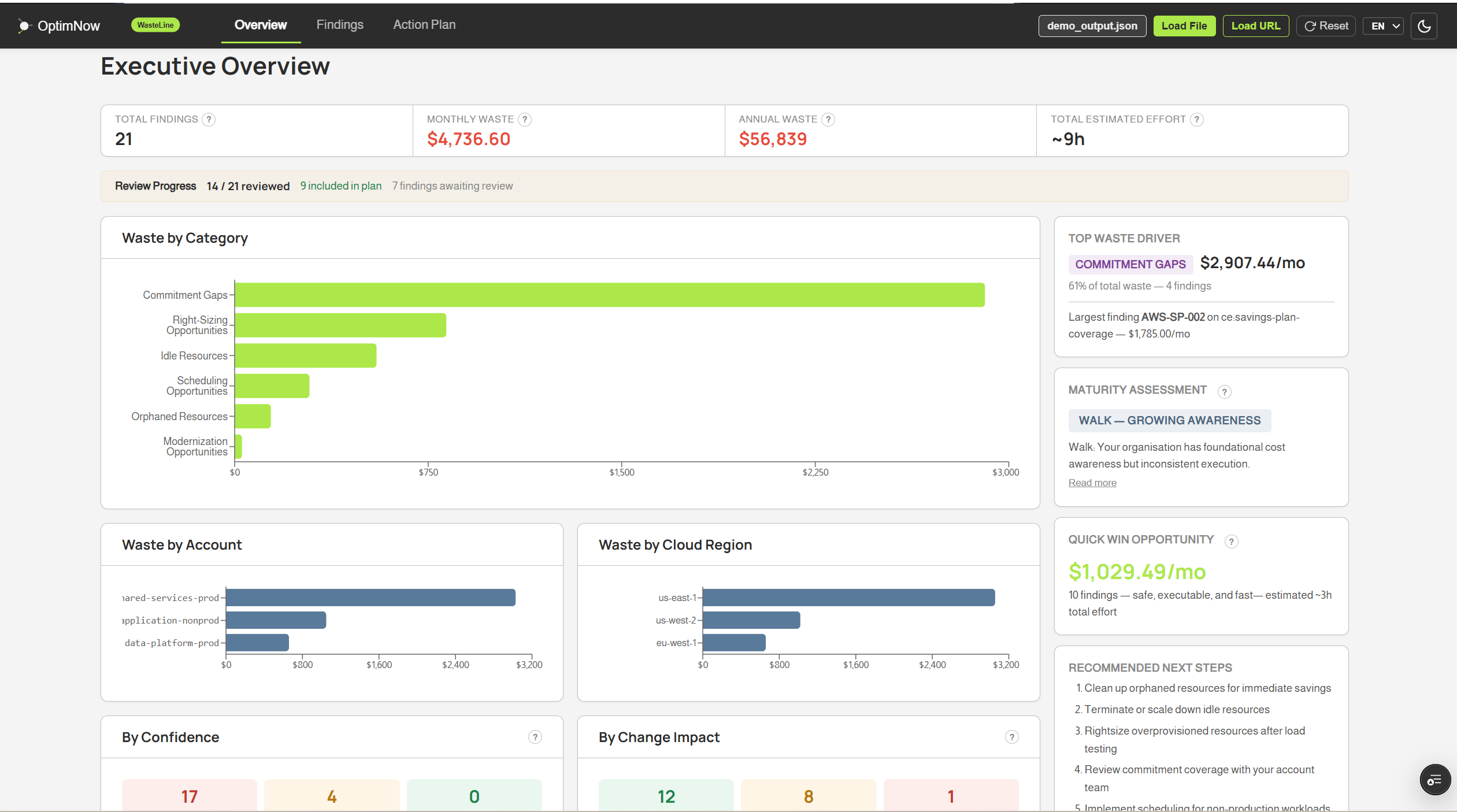
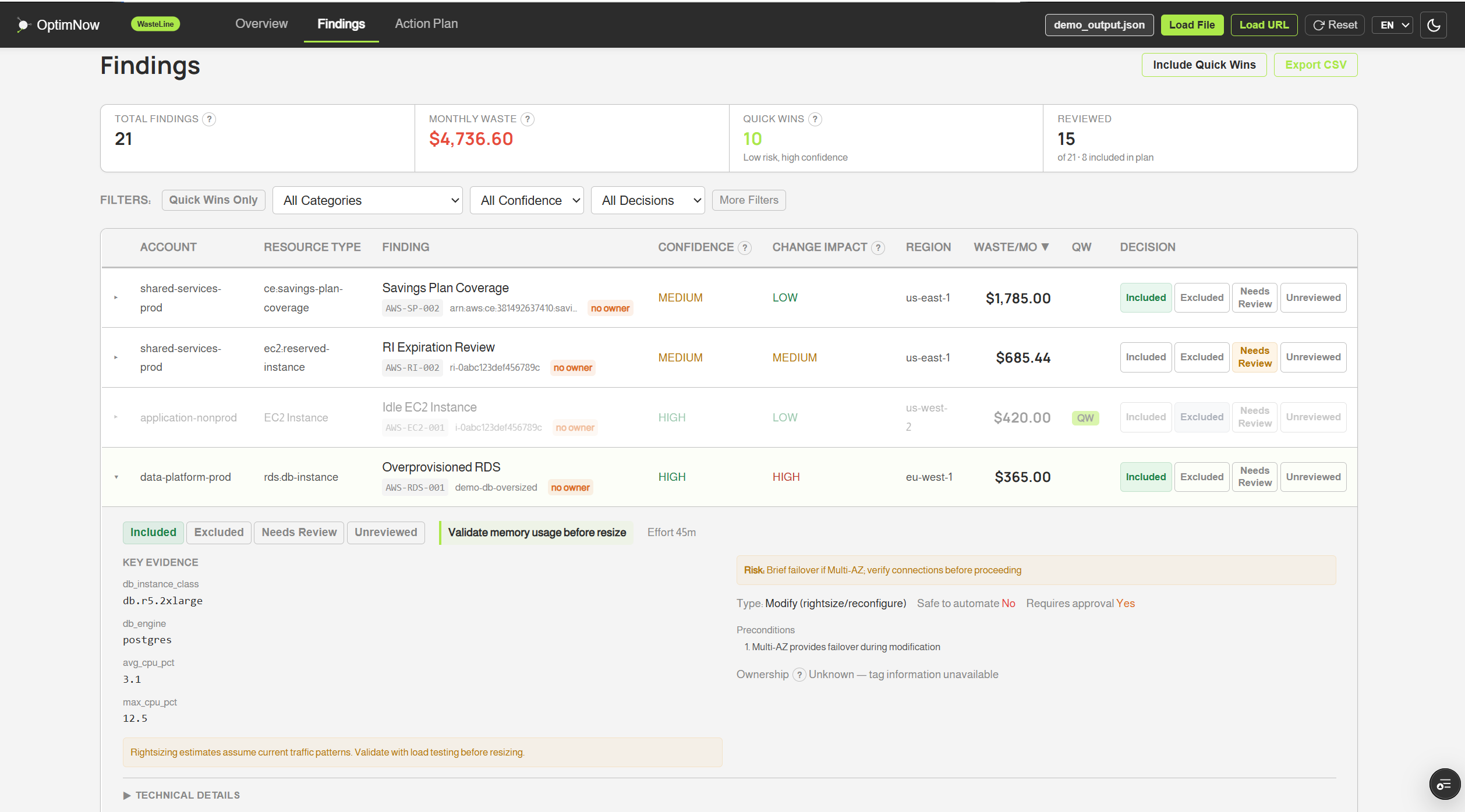
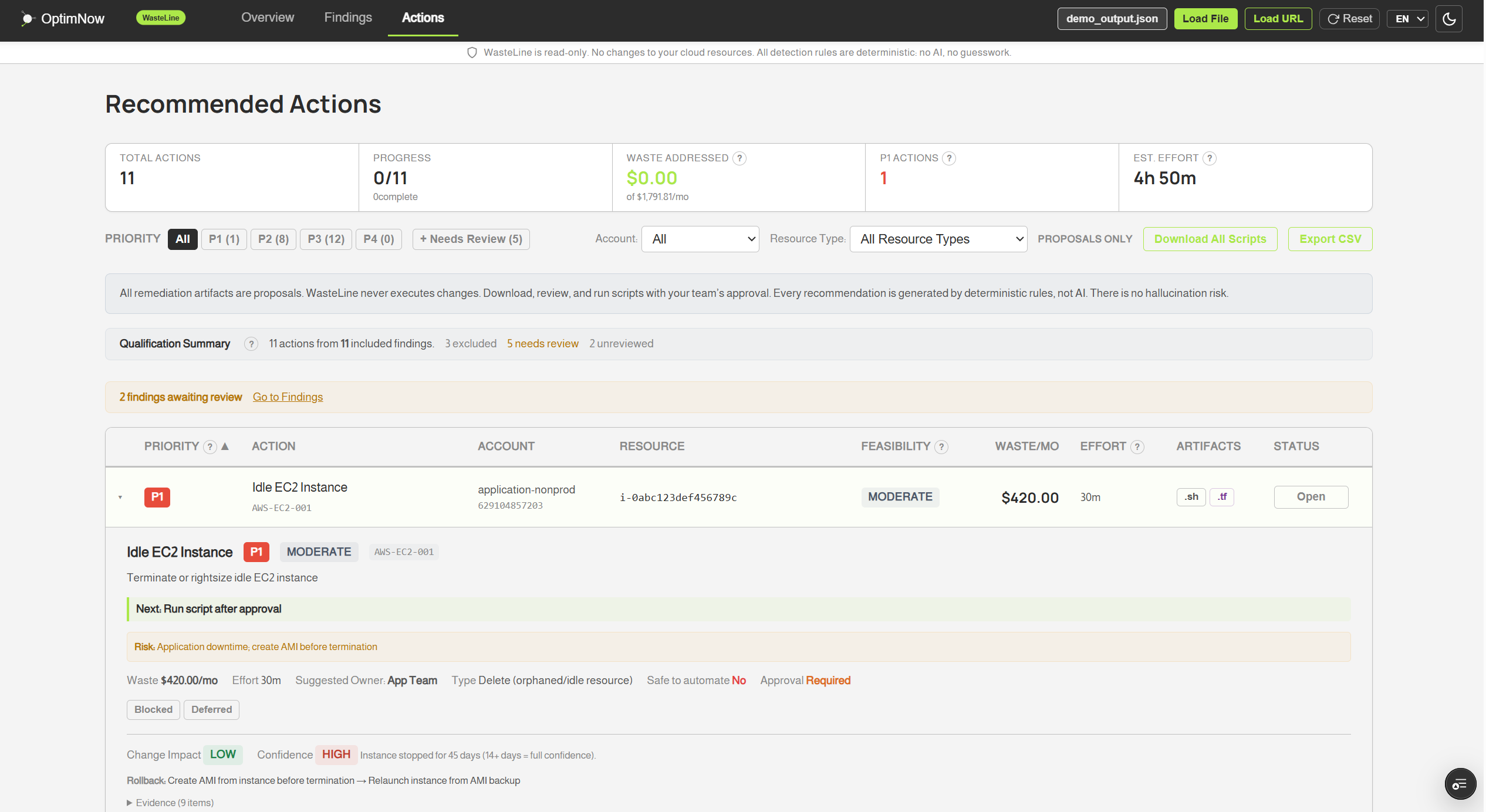
The real dashboard, running now
Interactive preview with sample data. Click around, filter, sort - it is the actual app.
The dashboard is optimized for larger screens. Open it on a laptop for the full experience - or tap below to try it anyway.
Open full viewCloud waste is visible.
Acting on it is not.
Most teams know waste exists. The gap is not detection. It is the effort required to validate findings, calculate impact, and build remediation artifacts that pass review.
- 1 Native recommendations are fragmented across services and accounts
- 2 Manual validation and cost estimation consumes engineering hours
- 3 Scripting remediation per finding is repetitive and error-prone
- 4 Low-value waste persists because it is tedious to address at scale
- 5 Leadership needs defensible numbers, not another dashboard
WasteLine closes the gap
One tool that detects waste, quantifies the cost, ranks findings by business impact, and delivers CLI scripts, Terraform snippets, and approval workflows your team can apply directly.
49 detection rules across 7 waste categories, including SageMaker and Bedrock. Executive-ready PDF reports. Full scan on a single account at no cost.
Install, scan, and hand prioritized recommended actions to leadership in one session.
Watch the walkthrough
A 5-minute overview of a full scan, from install to executive report.
Claude Code quickstart walkthrough coming soon
We're recording a hands-on walkthrough of a full WasteLine scan driven from Claude Code inside a sandboxed Lima VM. In the meantime, grab the starter pack below and try it yourself - about 10 minutes end-to-end.
From scan to remediation in five steps
Each step produces artifacts your team can review, approve, and act on.
Detect
Scan for orphaned, idle, overprovisioned, commitment-mismatched, and schedule-blind resources.
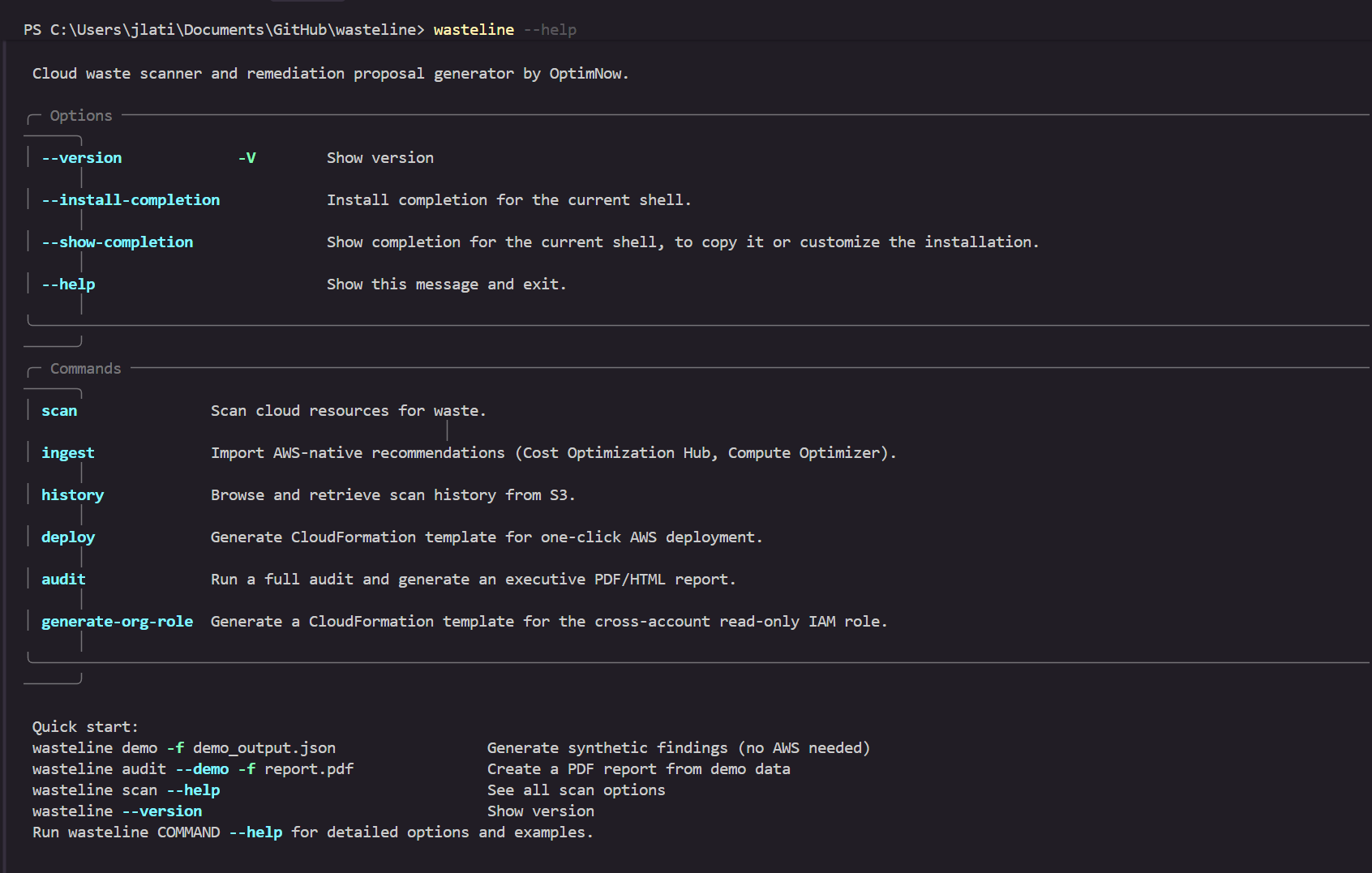
wasteline scan
Quantify
Each finding includes estimated monthly cost impact from CloudWatch metrics and pricing data.
Prioritize
Findings ranked P1-P4 by cost impact, confidence, blast radius, and estimated effort.
Remediate
Pre-built AWS CLI scripts, Terraform snippets, and OpenOps approval workflows per finding.
wasteline remediate
Track
Compare scans over time. Detect new waste and monitor remediation progress.
wasteline scan --baseline
Deploy WasteLine from Claude Code, Codex, Cursor, Gemini CLI, or Kiro
Download the starter pack. Paste the bootstrap prompt into your AI coding assistant. It discovers the CLI, proposes the config, and runs your scan - with your approval at every step.
Download
Grab the Quickstart VM ZIP. Lima VM config, README, and bootstrap prompt - nothing to install beyond Lima.
Open in your assistant
Claude Code, Codex, Cursor, Gemini CLI, Kiro. WasteLine exposes itself via --help and MCP, so agents discover commands without reading docs.
Scan and remediate
The assistant proposes the scan config, waits for your approval, and hands you back the same findings and remediation scripts as the direct CLI.
The AI assistant orchestrates the CLI. It does not run the detection logic. All 49 rules and every remediation script are deterministic and rule-based - the output is identical whether you run the CLI directly or through an assistant.
Lima VM config, README, bootstrap prompt, IAM policy, and Kiro steering file inside.
49 rules across 7 waste categories
Each rule detects waste, estimates cost impact, and generates remediation artifacts.
Orphaned
EBS volumes, Elastic IPs, security groups, AMIs, snapshots, empty S3 buckets, ECR lifecycle, stale multipart uploads, unused secrets
Idle
EC2 instances, load balancers, CloudWatch log groups, NAT gateways, S3 buckets, Lambda functions, DynamoDB tables, Redshift clusters
Overprovisioned
EC2 compute, EBS storage, RDS databases, S3 storage classes and versioning, CloudWatch log retention, DynamoDB provisioning, ECS Fargate scaling, CloudTrail duplicate trails
Commitment gap
Reserved Instance utilization and expiration, Savings Plans coverage and utilization, ElastiCache reserved node coverage
Schedule blind
Non-production EC2 running 24/7, Redshift clusters without pause schedule
Modernization
Older-generation EC2, EBS, and RDS instance types; x86 to Graviton migration for EC2, Lambda, and ECS; RDS extended-support engine versions
FinOps for AI
SageMaker idle notebooks and inference endpoints, stale Studio apps, on-demand training without Spot; Bedrock under-utilized Provisioned Throughput, superseded and orphaned custom models, over-provisioned capacity
Your data never leaves your account
WasteLine runs entirely inside your AWS environment. No SaaS backend, no shared state, no outbound calls.
Get/List/Describe only
No write calls. Enforced by AST analysis in CI and runtime SDK guards.
Zero outbound calls
No telemetry, no phone-home, no license server. Deploy in private subnets with existing NAT or VPC endpoints.
Results stay in your S3
Static dashboard reads a local JSON file. No server, no shared state, no cross-tenant exposure.
SHA-256 signed findings
Deterministic scans with manifest hash verification. Safe for CI/CD and change management.
Productized from enterprise FinOps delivery
WasteLine is not a generic scanner. It is built from patterns observed across real FinOps engagements, where teams need defensible recommended actions, not another cost dashboard.
Every detection rule, prioritization model, and remediation template is designed to fit governance and approval workflows. The output is structured for teams that need to present findings to leadership and execute changes through established processes.
WasteLine is part of OptimNow. Simple, Smart, and Sustainable Cloud Financial Management.
Start free. Scale when you're ready.
See your full waste exposure at no cost. Unlock detailed findings, remediation, and automation as you grow.
- All 49 detection rules scanned
- 5 rules fully detailed (EBS, EIPs, S3, SGs, Bedrock)
- 44 rules shown as summaries
- Interactive dashboard
- JSON & CSV output
- All 49 rules with full detail
- CLI, Terraform & OpenOps remediation
- PDF/HTML executive reports
- Multi-account scanning
- AI-powered narrative & drift tracking
- Everything in Professional
- Automated Fargate scanning
- CUR integration (actual costs)
- AWS-native recommendation ingestion
- White-label dashboard
- CloudFormation one-click deploy
- Everything in Enterprise
- Monthly facilitated review
- Progress & maturity coaching
- Stalled-remediation accountability
- Strategic commitment & scheduling advice
- Direct OptimNow FinOps expertise
All plans are annual. Need a custom scope? We also offer ad-hoc workshops and standalone consulting engagements.
Ad-Hoc Workshops
Standalone consulting engagements: scoped, deliverables-based, priced per engagement.
Commitment Management
Optimize your RI and Savings Plan portfolio. Utilization analysis, term strategy, marketplace exit planning, and renewal timing.
FinOps for AI
Right-size AI/ML infrastructure spend with WasteLine's native SageMaker and Bedrock detection, plus strategic guidance on GPU instance selection, commitment strategy, unit economics, and spot/on-demand mix.
Budget, Forecast & Governance
Design your cloud cost governance framework. Remediation SLAs, budget allocation, tagging governance, and executive reporting cadence.
Run the full scan. See what you find.
49 rules, executive report, and remediation artifacts on your account, at no cost. Book a 15-minute walkthrough, or run it yourself.
Prefer email? contact@optimnow.io